WORDPRESS PLUGIN
Send Your WordPress Updates Directly to WhatsApp
WP WhatsApp Notifier connects your WordPress website with the Meta WhatsApp Cloud API and automatically notifies subscribers when you publish new posts.
Automatic Notifications • Subscriber Management • Delivery Tracking • Message Logs
Everything You Need to Notify Your Subscribers
WP WhatsApp Notifier makes it easy to connect your WordPress content with WhatsApp. Manage subscribers, send automatic notifications, and monitor message delivery from your WordPress dashboard.
📱 WhatsApp Cloud API
Connect your WordPress website with the Meta WhatsApp Cloud API and send template-based notifications.
🔔 Automatic Notifications
Automatically notify active subscribers whenever a new WordPress post is published.
👥 Subscriber Management
Add, manage, activate, deactivate and remove WhatsApp subscribers from your dashboard.
📊 Message Logs
View API status, WhatsApp message IDs, delivery status and notification responses.
📬 Delivery Tracking
Track Sent, Delivered, Read and Failed events through WhatsApp webhook updates.
🔄 Duplicate Prevention
Prevent duplicate notifications for the same published post and subscriber.
How WP WhatsApp Notifier Works
Connect your WhatsApp Cloud API, add subscribers, and let the plugin handle notifications when you publish new WordPress content.
01. Connect WhatsApp
Configure your Meta WhatsApp Cloud API credentials and notification settings.
02 . Add Subscribers
Allow visitors to subscribe to WhatsApp notifications and manage subscribers from WordPress.
03. Publish a Post
Publish a new WordPress post as you normally do. No extra action is required.
04. Send Notification
The plugin sends your configured WhatsApp template to active subscribers and records the notification status.
Create Your WhatsApp Subscriber Page
Give your website visitors an easy way to subscribe to WhatsApp notifications.
After installing WP WhatsApp Notifier, simply create a WordPress page and add the shortcode:
[wwn_subscribe]
The plugin automatically displays the Subscribe and Unsubscribe form on that page.
How to set it up
01. Create a new page
Go to:
WordPress Dashboard → Pages → Add New
Give the page a title such as:
WhatsApp Job Alerts
02. Add the shortcode
In the WordPress editor, add a Shortcode block and enter:
[wwn_subscribe]
WordPress officially provides a Shortcode block for inserting shortcode-generated content into pages.
03. Publish the page
Click Publish.
Your plugin will automatically display the WhatsApp subscription form.
Visitors can then:
- Enter their WhatsApp number
- Subscribe to alerts
- Receive notifications when new content is published
- Unsubscribe when they no longer want alerts
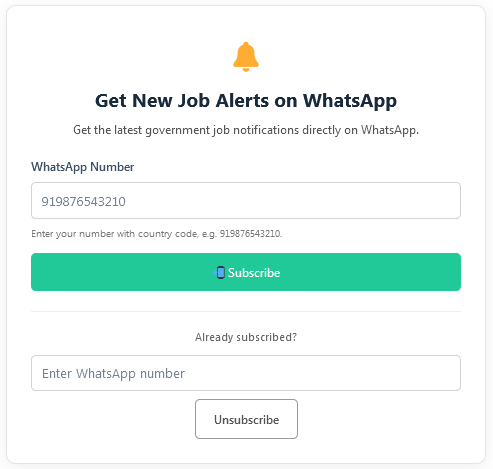
Example
Your website might have a page such as:
yourwebsite.com/whatsapp-job-alerts/
with a form like:
🔔
Get New Job Alerts on WhatsAppGet the latest notifications directly on WhatsApp.
WhatsApp Number
[ Enter your number ][ Subscribe ]
Already subscribed?
[ Enter WhatsApp number ][ Unsubscribe ]
No coding required
You don’t need to create the form yourself.
WP WhatsApp Notifier generates the subscription and unsubscribe form automatically when you use the[wwn_subscribe]shortcode.
The appearance of the subscriber form may vary depending on your WordPress theme and website styling.
Powerful WordPress Admin Dashboard
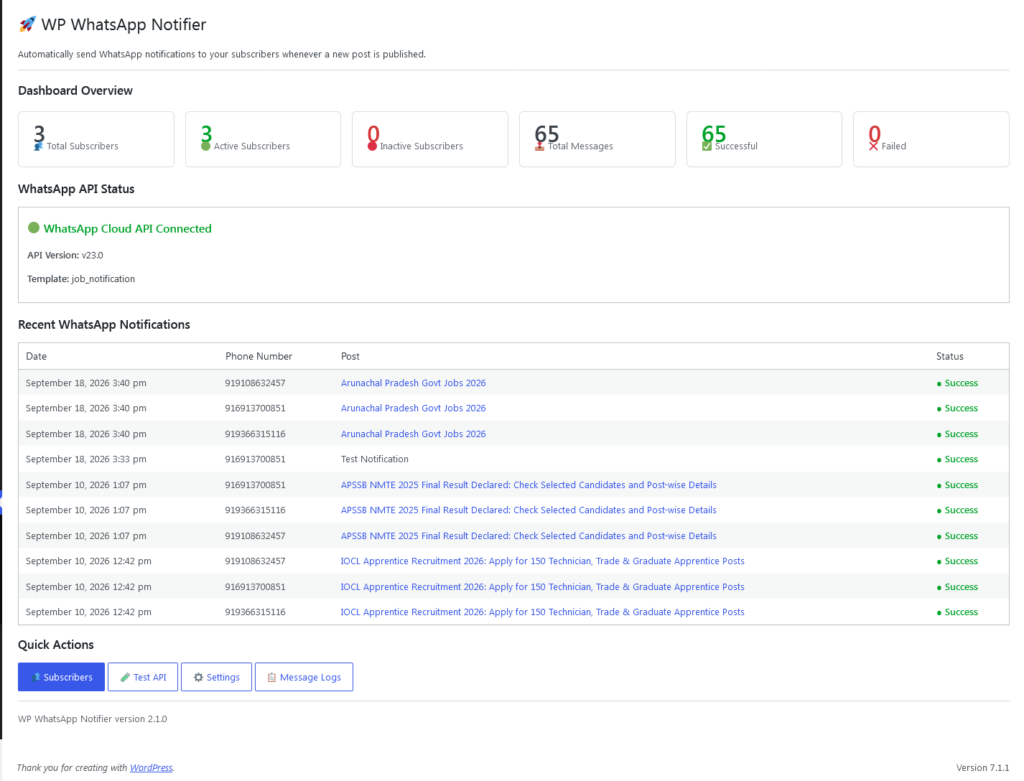
Manage subscribers, monitor WhatsApp notifications, track delivery status and configure your API settings—all from your WordPress dashboard.
Dashboard
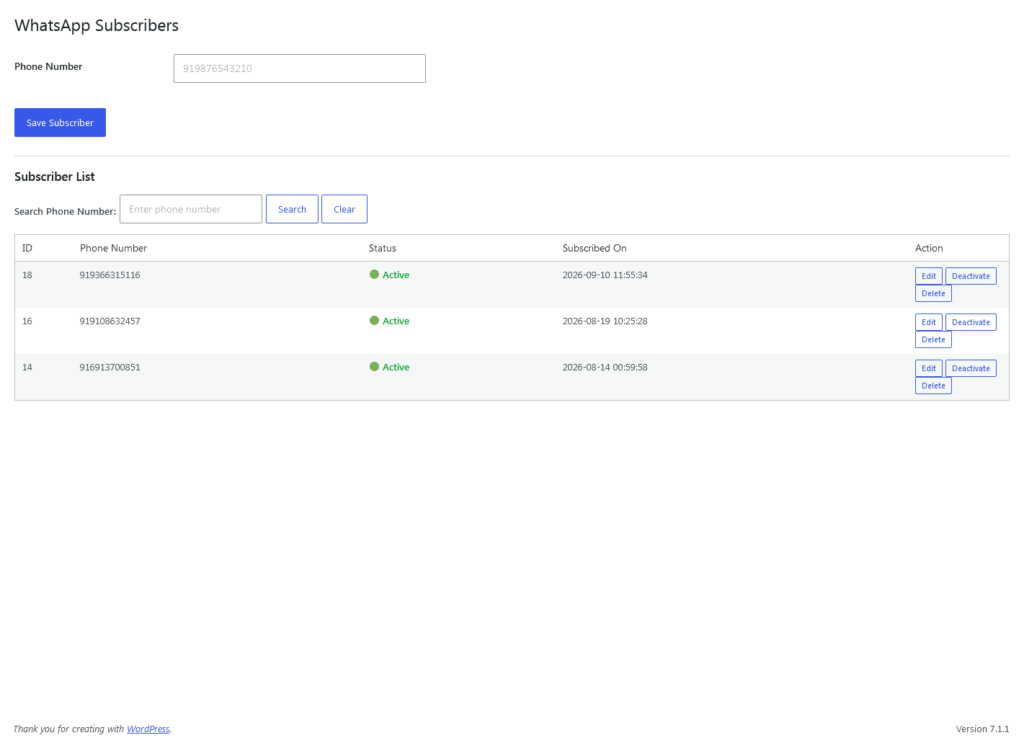
Subscriber Management
Easily manage active and inactive WhatsApp subscribers.
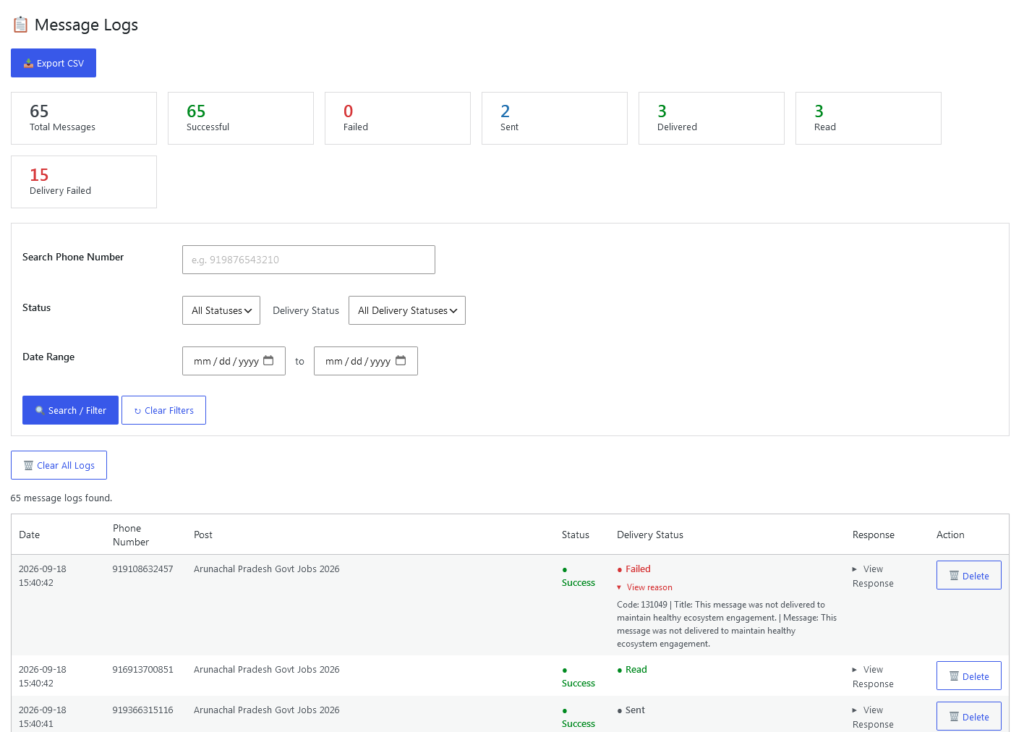
Message & Delivery Logs
Monitor API responses, message IDs and delivery events.
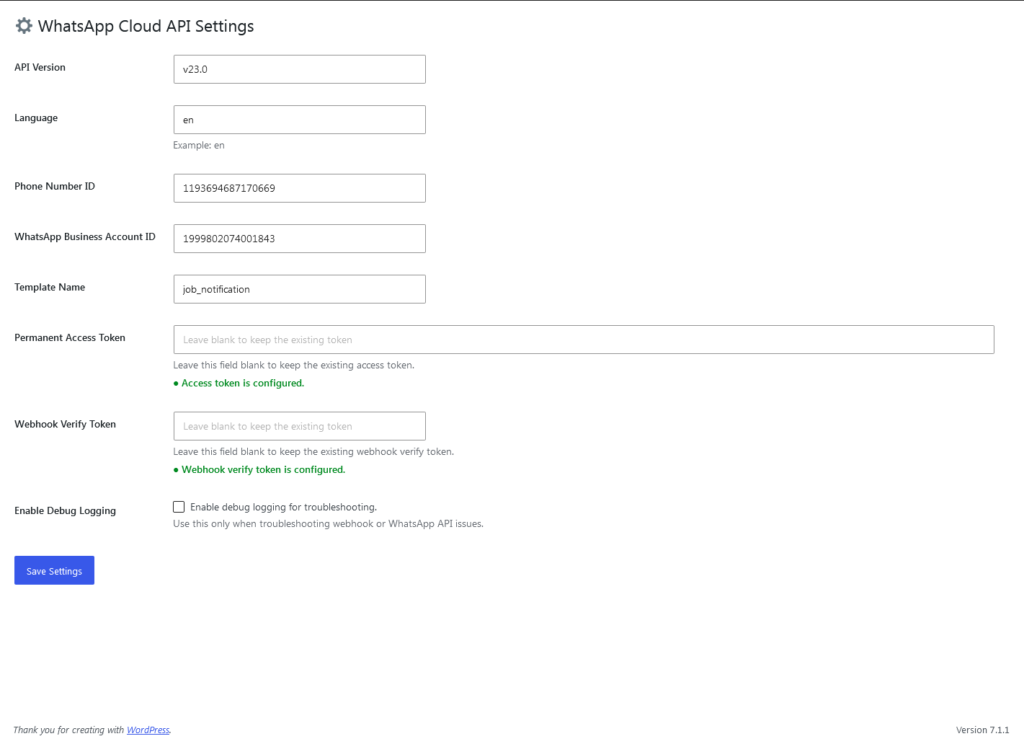
Simple Configuration
Configure your WhatsApp Cloud API settings from one place.
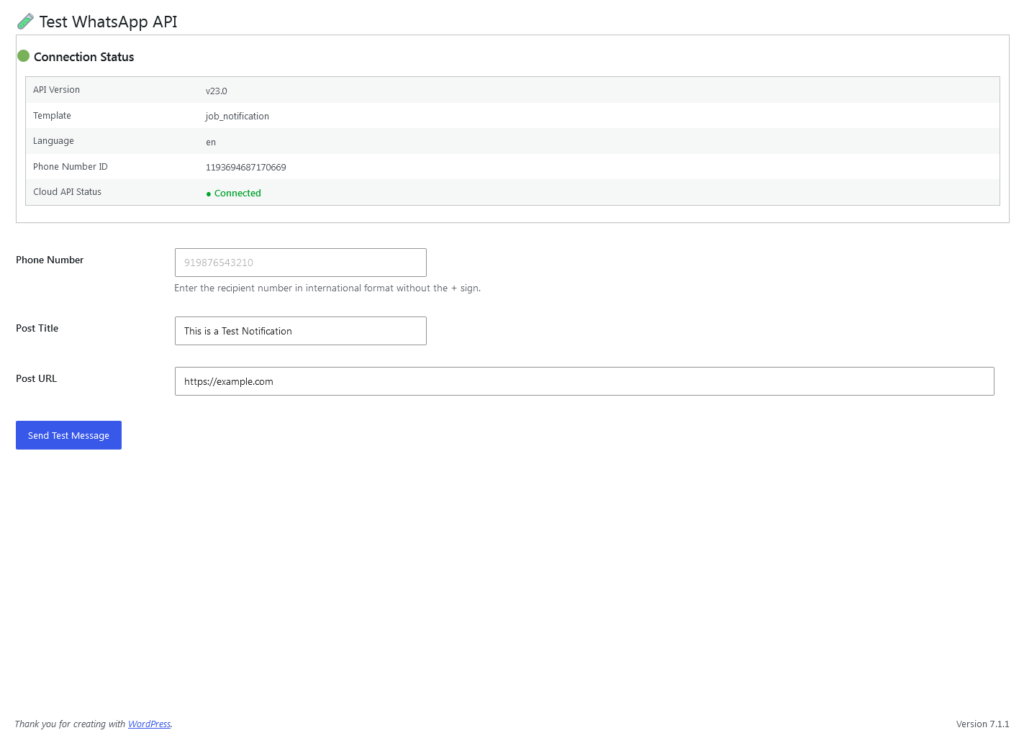
Test Your Connection
Send a test notification before enabling automatic notifications.
Requirements & Compatibility
WP WhatsApp Notifier is designed for WordPress websites using the Meta WhatsApp Cloud API. Before installation, make sure your website meets the following requirements.
WordPress Requirements
- WordPress: 6.5 or higher
- PHP: 7.4 or higher
- HTTPS: Recommended for production websites
- Administrator access: Required for plugin configuration
WhatsApp Requirements
- Meta WhatsApp Cloud API
- WhatsApp Business Account
- WhatsApp Phone Number ID
- WhatsApp access token
- Approved WhatsApp message template
- Webhook configuration for delivery tracking
Important: WhatsApp message delivery is handled by Meta’s WhatsApp Cloud API and is subject to Meta’s policies, limits, template requirements and delivery decisions.
Changelog
Version 2.1.1 — October 2026
Improvements and fixes
- Improved database table creation and verification for message delivery tracking.
- Improved compatibility of message logs with delivery-status and delivery-error fields.
- Fixed database-related issues encountered when viewing message logs.
- Improved plugin stability and release packaging.
Note: WhatsApp message delivery depends on Meta’s WhatsApp Cloud API, recipient eligibility, and Meta’s messaging policies.
For installation instructions and configuration details, please refer to the included plugin documentation.
Simple Pricing for WordPress Websites
Choose the license that fits your project.
Personal
For personal websites and small projects
₹999
- 1 Website
- WhatsApp Cloud API integration
- Automatic post notifications
- Subscriber management
- Message & delivery logs
- CSV export
- 1 year updates
- 1 year support
Please review our License, Support & Refund Policy before purchasing.
Business
For businesses and professional websites
₹1,999
- Up to 5 Websites
- All plugin features
- WhatsApp Cloud API integration
- Subscriber management
- Delivery tracking
- CSV export
- 1 year updates
- 1 year support
Agency
For agencies and multiple client websites
₹4,999
- Up to 20 Websites
- All plugin features
- WhatsApp Cloud API integration
- Subscriber management
- Delivery tracking
- CSV export
- 1 year updates
- 1 year support
Need Setup Assistance?
Don’t have experience with Meta WhatsApp Cloud API? No problem. VastWP Studio can guide you through the WhatsApp setup, plugin installation, configuration and testing.
Frequently Asked Questions
1. What is WP WhatsApp Notifier?
WP WhatsApp Notifier is a WordPress plugin that connects your website with the Meta WhatsApp Cloud API and sends notifications to subscribers when new posts are published.
2. Do I need a WhatsApp Business Account?
Yes. The plugin requires a Meta WhatsApp Cloud API setup with the necessary WhatsApp Business Account and API credentials.
3. Can I manage subscribers from WordPress?
Yes. You can manage active and inactive subscribers directly from the WordPress dashboard.
4. Can I track message delivery?
Yes. The plugin can record WhatsApp message IDs and webhook delivery events such as Sent, Delivered, Read and Failed.
5. Does the plugin guarantee WhatsApp delivery?
No. Message delivery is controlled by Meta’s WhatsApp Cloud API and is subject to Meta’s policies, limits and delivery decisions.
6. Can I test the WhatsApp connection before using it?
Yes. The plugin includes a Test API section that allows you to send a test notification.
7. “Do you create the subscriber page for me?”
No separate page development is required. Simply add the [wwn_subscribe] shortcode to any WordPress page, and the plugin generates the subscriber form automatically.
Need Help?
For installation, configuration, licensing, or support assistance, contact VastWP Studio.
Email: support@vastwpstudio.com
Ready to Connect WordPress with WhatsApp?
Keep your subscribers informed whenever you publish new content with WP WhatsApp Notifier.